
Best Mac products of the week June 1, 2026
Explore the most innovative and popular mac products that captured the community's attention during week. These rankings help builders compare standout launches, understand what each product does, and discover practical tools shaping the future of technology.
Period
Weekly ranking
Published for
June 1, 2026
Selection
5 ranked products
Ranked list
Community-backed mac picks
Each product profile includes the launch story, visual preview, and direct product link so readers can move from discovery to evaluation quickly.
01

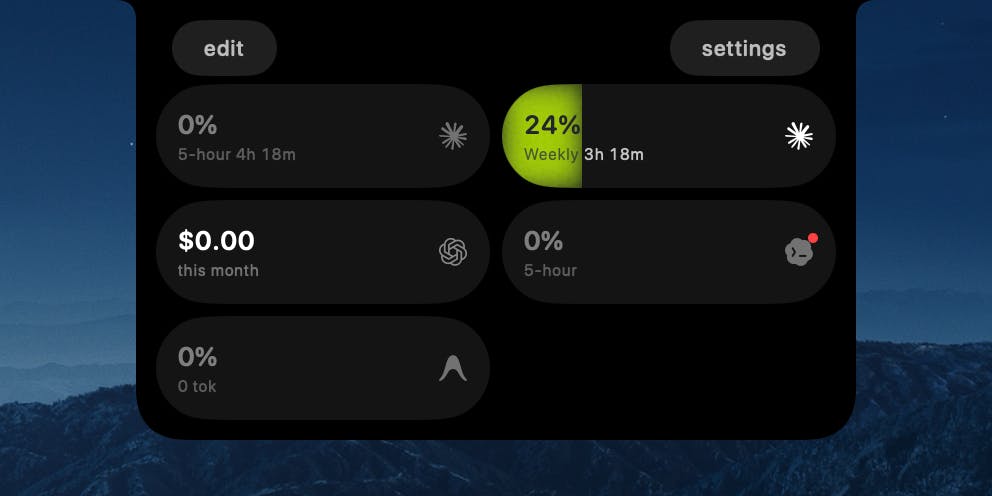
TrackNotch is a native macOS application that offers real-time monitoring of your AI tool usage, conveniently displayed directly within your MacBook's notch. This innovative app provides instant visibility into your Claude, OpenAI, Cursor, and Codex usage, including context arc, budget tracking, and current rate limits. Designed with privacy as a core principle, all data processing is strictly local to your machine; there are no proxies, no telemetry, and absolutely nothing leaves your device. TrackNotch is completely free and open-source, providing transparency and control over your AI resource consumption.
02

Presentify is a versatile macOS application designed to enhance your presentations and screen sharing experiences. It allows you to effortlessly annotate your screen, highlight your cursor to draw attention, spotlight important areas for emphasis, and zoom in for a closer, more detailed look. This powerful tool works flawlessly with all major presentation applications, including Keynote, Google Slides, and Microsoft PowerPoint. Furthermore, it integrates perfectly with popular video calling platforms such as Zoom, Microsoft Teams, and Google Meet, making your online interactions more engaging and effective.
03

RadianceKit is the pioneering native macOS application for 3D Gaussian Splatting, transforming how you create photorealistic 3D models. Simply drop in your photos or video footage of any object or scene, and RadianceKit intelligently aligns the cameras, trains the underlying model, and renders a stunning, photorealistic 3D reconstruction. All this complex processing is handled efficiently and entirely locally on your Mac's GPU, eliminating the need for Python, CUDA, or cloud services. It offers a convenient Simple Mode for one-click results, specialized Scene-Class Presets for Render, Outdoor, or Indoor environments, and comprehensive Expert controls for advanced users. You can export your creations to six different formats, generate captivating orbit videos, and share them via integrated web viewers. Optimized for M1 Macs and newer, it is available for a one-time purchase of $7.99, with a 3-day trial period to experience its capabilities firsthand.
04

We all know that frustrating moment: you are certain a file exists, but Spotlight just cannot seem to find it. Stella solves this problem elegantly. Simply describe what you are looking for, using natural language like, "my cheat sheet for the final exam," or "the product spec from last week's meeting," and Stella will quickly locate it. From there, you can easily drag the file straight into an email like Gmail, open it directly, or even launch any associated application, all from the same convenient search bar. It is a single, powerful shortcut for your entire Mac, completely free, private, requires no account setup, and it happily welcomes even the most disorganized filenames.
05

Clipto AI offers a powerful, privacy-focused solution for managing your digital media, similar to Google Photos but entirely local. It transforms vast amounts of video, audio recordings, meeting transcripts, and various files into easily searchable memories, all without ever uploading your sensitive data to the cloud. Clipto intelligently tags people, recognizes dialogue, and identifies distinct scenes automatically, enabling you to pinpoint any specific moment hidden within your extensive media library simply by describing what you need. This advanced indexing is remarkably fast, with Clipto capable of processing 2 terabytes of video on a MacBook Pro M5 in just 24 hours, ensuring quick access to your most important information.